
Category: Articles

  • How I Run an Efficient Simplex Net

    Our goal in all we do as ARES volunteers is to get the job done as accurately and efficiently as possible. A simplex net that covers a large geographical area is a particular challenge. Our monthly second Wednesday simplex net gives us the chance for net control and other net members to learn how to keep it simple and quick.

    After a brief preamble, net control calls for checkins by team. As net control, after acknowledging the stations I hear, I ask the station with the strongest signal for any callsigns they have heard that I didn’t recognize. After acknowledging those stations, I then ask the relay station to call for any other team members who have not checked in or been recognized to try again. Before moving on to the next team I make one more call for any station to relay in any other stations they may have heard that I have not recognized.

    All net members should copy all stations they hear and mark each callsign when it is recognized by net control. Not only is this good practice for when it’s your turn to be net control, it also means you will be ready if you are the station net control asks for relays. By marking callsigns when they are recognized, you won’t be relaying in stations already checked in and you will be able to relay in for that last call for any missed stations.

    One key to keeping it efficient is for net members to NOT try to relay each scratchy station as it comes in. Be patient and wait until net control asks for relays. I have heard helpful minded stations offer relays before being asked and this can be confusing to net control and cause undue delays. Remember that what may be very difficult for you to hear may be perfectly clear to net control and that net control will ask for relays. Wait for that request. Another key is for net control not to agonize over each scratchy signal. Just recognize the clear ones first and then ask for relays. That’s what the relay stations are for.

    This is a different procedure than the weekly net on the MC1 repeater. There, net control can ask a station with a poor signal to make adjustments and try again. If the signal is still not readable, net control can ask other stations to listen on the reverse and then ask the scratchy station to try once more. Then if someone did pick it up on reverse, they can offer the relay. Relays are not held to the end of each team’s checkins.

    One last note: If you try to tune into the simplex net and cannot hear net control intelligibly or at all, don’t give up. Wait until you hear someone ask for your team’s relays. If you are on Delta, Echo or Mike teams, you will be waiting longer than those on the Alpha or Bravo teams. And of course Charlie Team is right there in the middle and often has the most relays thanks to those west hills.
  • From the EC’s Desk

    Grounds and Grounding

    There has been a lot of activity in the station building front in MCARES over the past few months. As I receive stories and reports I am greatly encouraged by everyone’s willingness to jump in and build a better radio station. One of the main topics of concern folks have when installing a new radio station is proper grounding. There is considerable confusion and strong feelings over this topic. I cannot hope to clarify the technical aspects of station bonding and grounding in a newsletter setting, but I do want to make sure that everyone is looking in the right places and asking the right questions when they consider their station grounds.

    There has been a lot of activity in the station building front in MCARES over the past few months. As I receive stories and reports I am greatly encouraged by everyone’s willingness to jump in and build a better radio station. One of the main topics of concern folks have when installing a new radio station is proper grounding. There is considerable confusion and strong feelings over this topic. I cannot hope to clarify the technical aspects of station bonding and grounding in a newsletter setting, but I do want to make sure that everyone is looking in the right places and asking the right questions when they consider their station grounds.

    First off, the best way to get the right information is to research the situation oneself from the appropriate resources! MCARES is adamant that the ARRL technical publications are the best place to find information that has been vetted by competent engineers and will lead to safe and effective station construction. The two best publications are Grounding and Bonding for Radio Amateur and The ARRL Handbook. Additionally, The ARRL Antenna Book for Radio Communications has very good in­-depth information regarding RF grounds and their effects on radiated signal.

    When one begins their shack, consider the four types of grounding/bonding that are part of proper station design. These are:

    • Electrical Safety Bonding
      • The ground that provides the path for over­current protection and provides chassis shock protection.
      • This is the third prong / green wire in your house distribution
    • RF Ground
      • It is important to keep the shack equipment at the same reference potential to avoid current flows or potential differences that can affect the operation of modern equipment.
    • Chassis Ground
      • These are the connections we think of for grounding inside the shack, the individual chassis connections to a great, fat ground bar that makes its way to a good earth ground.
      • Bonding of equipment to prevent RF flow between them can be difficult, so make sure your ground strap setup is as clean and short as possible.
    • Lightning Dissipation
      • The design of these systems can be complicated; make sure to review your desired results before implementing lightning protection. Again, review the appropriate technical references when you go to set up your operating station, and stay away from QRZ and eHam forums; you’ll find too much time there will make you want to give up on grounding altogether.
  • How to Prepare for and Participate in a MCARES Drill

    The Winlink Drill from Home on February 9 indicated that we need to improve in three basic ways: understanding the drill guide, testing knowledge and equipment, and sticking to business.

    The first and last step in preparation for any drill is to read the Drill Guide. This is usually emailed to the entire membership up to a week or two before the drill. Read it carefully all the way through as soon as you receive it and be sure you understand what is expected of you. If you don’t understand something, email leadership [at] multnomahares [dot] org for clarification. If we get the same question several times, we will revise the guide. Watch for a last minute revised drill guide and read it all the way through again. About an hour before the drill starts, read the drill guide all the way through again, and again, and again. Print it, highlight the tasks and instructions you will need and keep it with you throughout the drill.

    As MCARES operators, we should always have our gear in top operating order and know how to use it. Drills give us an opportunity to check this. At least a day or two before the drill, check out the equipment you will be using, including the software. Are your batteries fully charged, including your laptop? Is your Winlink Express version up to date? If you don’t do this often, you may need to reinstall with the latest version. Update the channel selection too. Waiting until the last minute may lead to unexpected delays if your operating system decides it needs a major update and you need to reinstall Winlink Express. Do you remember how to send and reply to Winlink template messages? Can you connect to two or three gateways?

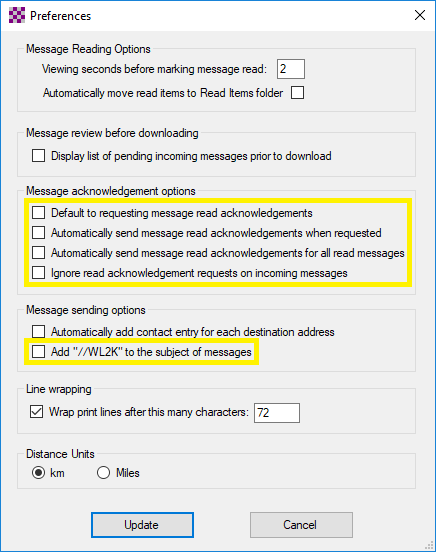
    Are your settings and preferences correct? Everyone, please, in Winlink Express click Settings then Preferences.

    • All of the boxes in the “Message acknowledgement options” section should NOT be checked.
    • In the “Message sending options” section, the “Add //WL2K’ to the subject of messages” should NOT be checked. //WL2K is ONLY needed if you are sending a message FROM a standard (not Winlink) email address to a Winlink address AND your standard email (from) address is not in the recipient’s whitelist.

    In a disaster situation and in drills, the airways and gateways are very busy. That is why we stress keeping all communications brief and to the point and we do not engage in chit-chat and social niceties. This goes for voice as well as Winlink. Do not send any messages that are not asked for in the drill guide. Do not send copies (cc) unless requested. Do not ask for or send receipt acknowledgement messages. Do not resend a message if you don’t get a response quickly. Do not send large file attachments. (One gateway crashed because of this.) All of these things steal time from the frequencies and gateways and slow the delivery of the essential message traffic.

    Every drill should be treated as if it were a real disaster response. Preparing for drills keeps us ready should something happen and we are activated. Following these suggestions (did I mention to read the Drill Guide?) will keep us all on our toes and ready to serve when we are called upon.

  • January 2019 VHF Contest After Action Report

    Usually a few small things go wrong, had a few more than usual this rove, but still a good time. First, the statistics:

    • 596 miles driven
    • Nine grids activated (had hoped for 12)
    • All Seven Bands 6m through 13cm got used
    • Preliminary 414 QSOs made
    • Lots of 2m FM activity in CN85

    A bit much of the rain at the Coasts making for a pretty soggy weekend to be out, but a dry Monday Holiday to put everything away was quite a gift.

    Antennas included loops for 6m through 70cm, verticals for 2m, 70cm, 33cm and 23cm, and gain antennas for 6m through 70cm. Those last four antennas proved to be “difficult when wet” and the SWR was unacceptable, causing me to leave them behind on the second day.

    Another antenna snafu occurred with a low hanging tree branch taking exception to the passing of my 6m loop – knocking it down but not off the roof of the car. All went back together and afterwards, my 2m loop featured a much better SWR – what?

    And on Sunday morning heading to the Coast my 2m FM rig was behaving strangely and I finally noticed that my radio bus voltage was 9.8V! Turned out my auxiliary battery had come unplugged from the car battery and I had flattened it. A few PowerPole arrangements later, it was out of the circuit for the rest of the journey and I made sure to run the engine more often.

    Most fun QSO was 222.1-SSB with Mike KB7W in CN93 from CN85 on Green Mountain Road (Kalama). LOUD armchair copy over a 150 mile path.

    Thanks to those ARES folks who got on the air – it was great to work everyone!

  • From the EC’s Desk

    Happy New Year, ARES!

    I hope everyone had an enjoyable holiday season. Now that the year has turned over, it’s time to get back into the swing of things. The leadership team has been working over the last month to put together a great plan and operating calendar for the upcoming year. To get the year off to a fast start, we will be participating in Winter Field Day as a unit for the first time.

    The training at the general membership meeting on January 24 will be on Winlink, to get us ready for our next drill on Feb 9. We felt last year’s drill from home using the Winlink system was a valuable experience, so that format will be duplicated for this drill with the addition of a resource net.

    The annual survey indicated you wanted more operating time so that is one of the key drivers of ARES this year. We all love to operate and doing so as often as possible is important for remaining sharp as a unit. We have forgone two-team drills this year in order to concentrate on drills as a full ARES unit. The goal will be to have some form of event members can participate in each month. This is not to say that we need everyone at every drill or event, but there should be more than enough opportunity for everyone to remain active.

    Coordinating an operating event or drill for the entire unit is a big lift, planning-wise. Thanks to all those who expressed interest in this task in the survey. We’ll work on incorporating those folks as we proceed.

    There are so many items I’d love to cover here, but instead I will take a large chunk of February’s general membership meeting to review continuing operating strategies and our upcoming year. For now, please review your kits, make sure your Winlink Express applications are up to date, and I look forward to seeing you all soon.

  • Send an ICS 213 Form with Your Phone!

    Did you know you could send a digital ICS213, and a large number of other forms or text, with just your Android phone and a radio? You can, and it’s super easy to do! The hardest part, really, is getting the software onto your phone.

    With the normal desktop version of FLDIGI, you can send nicely formatted forms using FLMSG. This is something that Matthew AF7PV has been exploring on the monthly digital ARES net and it works really well. It works great using a Signalink and even works well just holding the radio’s hand mic up to the speakers of the laptop, just like the smartphone SSTV apps do.

    The developers of FLDIGI came out with an Android version called AndFLmsg. You can’t get it from the Google Play store, but you can download it and install it directly to your phone from the Sourceforge website where you download the normal desktop version.

    The mobile app strips out a lot of the desktop FLDigi application, leaving mostly just the NBEMs messaging forms and a few of the popular modes. What’s great about the mobile version is that creating and managing messages looks just like email in the app. Honestly, it’s much easier to use than that desktop version.

    At the last monthly digital meeting I was able to both transmit and receive several FLDIGI form-based messages just by acoustic coupling. So even if you don’t have a big mobile radio, a laptop and a fancy Signalink digital interface, you can still participate in the monthly digital net just by putting your phone up to your radio’s speaker. We think his might have a lot of value for ARES operations, especially for something like the mass delivery of update messages or something along those lines.

    Although sadly there is no iOS version of this app for apple devices, you can get the desktop version of FLDigi for OS X on a Mac, which supports the message and form functions.

    Come help us experiment on Matthew’s Digital Modes Net, the first Tuesday of every month on the 443.300 repeater.

  • Digital Modes Net Explores Fldigi

    The members of the monthly Digital Modes Net have begun experimenting with Fldigi. This “Fast Light Digital” application runs on several different OS platforms and uses your sound card (e.g. a SignaLink) to send digital information over the air. No TNC is required for this mode.

    The Fldigi application provides a chat interface in which text is sent as you type it, but there are additional applications that allow more sophisticated data transfers. Flmsg is one such program; it works in cooperation with Fldigi to send form data, and there is a built-in template for the ICS-213 message form as well as the ARRL radiogram. Flmsg applies a checksum to the form data to detect transmission errors. Similarly, the Flwrap application cooperates with Fldigi to send arbitrary file data, also with a checksum.

    There is an overlap in functionality between Flmsg and Winlink, but one interesting difference is that whereas Winlink is more or less for communication between two stations, Flmsg can be used to send a message to multiple stations simultaneously. That’s also true for Flwrap — it might be used to send file data from the EOC to all field stations in a single transmission, for instance. The data rate is rather slow, so this might be done simplex rather than via a repeater.

    Join the Digital Modes net on the first Tuesday of the month if you’d like to give it a try. Time and frequency details are on the nets page.

  • What is GIS?

    ARES is an emergency communications organization. Traditionally, emcom has been concerned mostly with radio and radio-related procedures, like the mechanics of a directed net or how to professionally move NTS traffic. As we’ve marched into the 21st century, we’ve seen the ARES scope of operations expand to include many different types of technology, like radio-based email systems, APRS, logging software, and mesh networking.

    One exciting technology that has been steadily improving and becoming more accessible is the use of Geographic Information Systems (GIS). GIS has moved out of the computer datacenter in the last decade, riding the coattails of smartphone adoption with “killer” GIS applications like Google Maps, Waze, and geocaching.

    GIS is a broad term that can refer to a number of different technologies, processes, and methods. Of course, we’ve been making maps for thousands of years but map making is only a tiny sliver of what today’s GIS systems can do. GIS applications, like Google Maps and many others, allow users to do far more than just make maps. They are tools that can create interactive queries (user-created searches), analyze spatial information, edit data in maps, and present the results of all these operations.

    It doesn’t take much imagination to see the many ways GIS could be useful in an emergency communications scenario. Maps can be an excellent way to communicate information, status, and action, and being able to quickly produce a map designed for a specific purpose (assigning teams to search grids, for example) is as critical a skill in a disaster as medical training or communications training.

    GIS, like desktop publishing or website design, is both simple and hard to learn. It’s pretty easy to get the hang of the basics but it takes years of training and experience (and a degree of innate talent) to actually be good at it. Luckily for MCARES and other emergency service-type organizations, the emcom needs for GIS content are modest and don’t, generally speaking, require a GIS degree to create.

    GIS has been a critical component to emergency services for decades, which is great because we don’t need to reinvent the wheel again. What we want to do is well trodden ground, in GIS terms, so let’s leverage the work others have done.

    MCARES plans to facilitate basic GIS training to its members over the next 18-24 months with the goal of developing a basic GIS skill set that can be used in a variety of capabilities. MCARES will be using a training program developed for Search and Rescue by a national team of GIS and emergency service professionals. It is a self-paced program that leverages free, industry-standard software and tools.

    And you don’t have to wait for MCARES to get started! Check out www.mapsar.net to review all the materials and start the training program. We hope to have a few GIS intro webinars over the summer and fall, but those will be overviews and only cover the basics. As with any skill, the value you’ll get is proportional to how much time you put into it.

  • Clark County Friday Night Roundtable Net is Worth a Listen

    One of the Nets that has captured my personal interest is the Friday Night Roundtable offered by the Clark County Amateur Radio Club on the second, third, and fourth Fridays at 7:00 P.M. on 147.24+ (tone 94.8). All stations are welcome and encouraged to participate, even if they are not club members.

    What’s so great about it? Everyone participates as much or as little as they want! Less experienced hams that feel shy about speaking on the air will find it to be a friendly place, as well as a wonderful source of tips and insights. Experienced hams will find an eager audience that wants to learn from their experiences.

    Net Control chooses the subject, and suggestions for subjects may be submitted to roundtable [at] w7aia [dot] org. For the past several weeks, subjects have included etiquette and protocols to use on the air, how to participate in a net, and unusual things that can be used for antennas.

    For more information see http://www.w7aia.org/nets.htm.

  • An Offline Document Vault for Your Go-Kit

    What documents and files would you want with you after a big disaster strikes, when you have no access to your computers or the Internet?

    When I attended the PBEM NET training, I heard the suggestion of having a USB flash drive containing digitized copies of important vital records, passwords, and other important information that could be useful at a time when your computers have been destroyed, and access to the Internet made unavailable.

    I think the same concept can become useful within the context of ARES and amateur radio operations.

    As a member of Multnomah ARES, you may be asked to deploy in locations and situations where you do not have ready access to the documents and tools you need. Why not have those files with you at all times?

    On my laptop, I have a “ham radio USB key” folder structure, under which I organize a variety of sub-folders.

    Under “Personal” I keep digital copies of any IDs and certificates that I may need to present to an Incident Commander when deployed: copies of my FCC licenses, copies of my Multnomah ARES certifications, certificates of completion of FEMA training, etc.

    Under “ARES” I keep copies of the Multnomah ARES Standard Operating Procedure (SOP), ICS forms, copies of Net scripts/preambles, and copies of the regional ARES frequency template.

    Under “PBEM” I keep documentation regarding the NET program, including the new “Section 900” detailing the practices of AROs within the PBEM NET guidance.

    Under “Manuals” I keep PDF copies of the user’s manual for all the equipment (transceivers, tuners, analyzers) that I personally own, I may have to operate at a Fire Station or Served Agency, and any popular product that I may encounter during emergency operations.

    Under “Reference” I have several of the ARRL published band charts, a digital copy of the ARRL Handbook (when you buy a copy of the book you get a CD-ROM with the PDF files) and the Antenna Book.

    Under “Software” I keep binary installers for popular ham radio software I may need, including RMS Express (to operate Winlink), CHIRP (to program radios), LibreOffice (to interoperate with Word and Excel documents), a PDF reader, 7-zip (to expand ZIP archives), MSSSTV, Easypal, my favorite text editor, FLdigi, and so on.

    Every time I find something new that I consider useful, I add it to this folder structure then, two or three times a year, I perform a sweeping review of the files in it. I may delete some information that has become obsolete, refresh the SOP with the new one, add a new copy of the HRO PDF catalog and delete the old one… you get the drift. When I am done, I take the entire folder structure and copy it to an 8GB USB flash drive that I have with me at all times.