
Tag: SSTV

  • Net News

    We will no longer be passing around a sign-up sheet for net control at the monthly meetings. Instead, each team will be assigned a month. This will give more folks a chance and we hope that every member will do it at least once. If you want help or moral support for your first time, just ask your team leader. An orange Go-Kit will be available for those needing a higher powered radio.

    The Digital net has been very successful and several members are gaining expertise in sending images both with sound card (SignaLink) and acoustic coupling, which only requires a radio and a smart phone. The Open Camera app for Android devices and Solocator for Android and iOS devices are camera apps that can embed GPS coordinates as well as time/date stamp onto the image. GPS coordinates must be included for images to be of any use to Emergency Management. Both apps are free. The DroidSSTV app for Android devices costs $6.99 and is what most of the smartphone users are using to send pictures from our phones; there is also an iOS app for this. You just hold the phone to the radio, hold down the PTT and send. You can check into the net for help in setting these up.

    The Traffic Handling Training Net (THTN) is gaining ground. We had 18 checkins on our last net. We sent two ICS 213s and a radiogram, and got lots of questions answered. You can use sample 213s to practice sending on the net, or compose your own NTS Radiogram.
  • News from Around the County

    Thanks to everyone who responded to the annual survey. The leadership team meeting in December reviewed and tried to address your requests and suggestions. This year’s calendar reflects many of your requests for more training and additional certification opportunities. The new monthly team drills are small scale exercises involving two teams. They are designed to give everyone more experience with our served agencies and field operations.

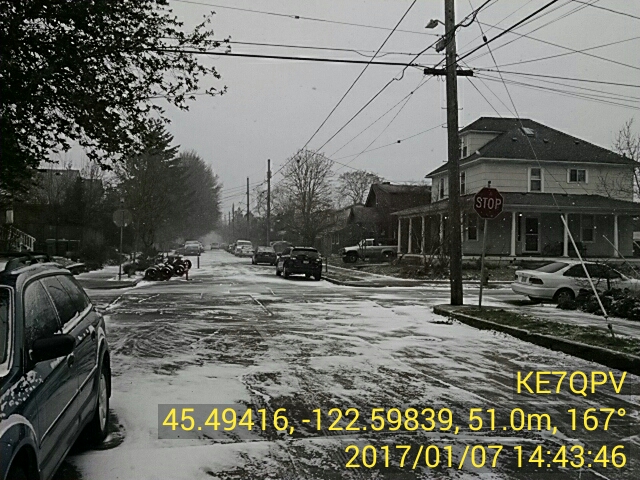
    On January 7 we were informed that the Multnomah County office of Emergency Management and the Portland Bureau of Emergency Management (PBEM) were opening a joint ECC for weather issues. It seemed like a great opportunity to show our abilities with a quickly put together SSTV demonstration. Adam took our new digital go kit to PBEM and eight of our members were able to send from their homes images of the current snow fall and conditions. The pretty cool part is that the pictures were uploaded to WebEOC and displayed on the map using the GPS coordinates embedded on the photos. The Portland EM staff had their first look at this ham radio technology and seemed pretty impressed.

    Robert WX5TEX will be leading the Q&A sessions at 6:15 PM prior to our monthly meetings. Bring your questions and he will help you get the answers. New members are encouraged to attend also.

    Nate will be reviewing the changes for 2017 and he will cover logging and ICS forms with us all at the January 26 meeting. Hope to see everyone there!

  • Digital Modes Training Net

    A new recurring net has been created with the goal of exploring some digital modes that should be useful for emergency communications. We’re using UHF and we’re initially focusing on SSTV (slow scan television) for image transfer and Fldigi for keyboard-to-keyboard text-based conversation. The net meets on the first Tuesday of the month at 8:00pm on the 443.300 MHz repeater, which requires a 100.0 Hz tone.

    A deluxe rig for both SSTV and Fldigi would include a laptop with an external sound card (such as the popular SignaLink USB sound card) cabled to your 70cm radio, but simpler setups can also work. For instance, there’s an SSTV program for the iPhone that can produce the right tones from the speaker, which you could hold close to your radio’s microphone. SSTV transmissions can then be decoded by holding your phone’s microphone close to your radio’s speaker. There are Fldigi apps available for Android, but we haven’t seen one for iOS.

    This net is totally about troubleshooting and practice, so feel free to join even if you’ve never used these modes before and you aren’t sure whether your rig will work. Matthew AF7PV is the net manager, and questions about the net may be directed to him at digitalnetmanager [at] multnomahares [dot] org. Links to useful software can be found on the Digital Net page.