Author: Eli W7ELI

  • Dos and Don’ts when Operating on a MCARES Net

    DO

    • Listen to Net Control’s instructions and check in as instructed, giving all information asked for, and nothing else.
    • Check in with your call sign phonetically. After this, you do not need to give it phonetically.
    • Especially on repeaters: PTT – inhale – talk; on linked repeaters: PTT – count to three – inhale – talk.
    • To eliminate doubling with someone else, listen before you talk.
    • If there is a double that doesn’t involve you, wait for net control to straighten it out and acknowledge those involved in the double.
    • If net control makes a mistake in acknowledging your call sign, say “correction” and then wait to be acknowledge before giving your correction.
    • Be forgiving. Be patient.
    • GO SLOWLY when transmitting anything the receiving station is writing down. Go even slower if asked to repeat.
    • Learn and use ITU phonetics.
    • Be efficient. Use pro-words and “short talk” such as: “with traffic”, “I say again”, “correction”.
    • If asked to repeat something, repeat it and spell phonetically.
    • If you are talking for more than two minutes, unkey the mike momentarily to let the repeater reset.
    • After check-ins, if you have something to say, give your call sign and wait for net control to acknowledge you before continuing.

    DON’T

    • Don’t challenge net control on the air.
    • Don’t try to check in before net control opens the net.
    • Don’t check in early; OK to check in late if you got lost in a double or simply joined late.
    • Don’t use Q codes.
    • Don’t sign in and say “no traffic.” Just say “with traffic” if you do have traffic to relay.
    • Don’t say “I pause,” or “I’ll let this drop”, etc. when you unkey the mike.
    • Don’t follow along and break protocol if you hear others doing so.
    • Don’t leave before the end of the net without signing out.
    • Don’t check in again if you are not recognized immediately. Instead, wait for net control to acknowledge the next group of check-ins. If you are not recognized then, try again in the next group or at the end of check-ins when net control asks for “late or missed stations.”
  • Pre-Net Checkins and Early Outs

    The weekly MCARES net meets every Wednesday at 7:00 PM on MC-1 (except on the second Wednesday of the month, when we either do a simplex net or use our portable or cross-band repeater). This is an information net which starts with a brief training “Gem” and an opportunity for questions and sharing when net control asks, “Are there any announcements, questions, contacts, or other business for the net?” We want your participation!

    This is not just a numbers net where all we want is the maximum number of checkins. Therefore, checking in with net control before the net starts or checking in at the beginning of the net and asking for an early out is not appropriate. If you have other obligations and can’t make the net, that’s OK. There are no “Brownie points” for a hit-and-run checkin.

    The net rarely runs for more than 30 minutes. Once you do check in, you are expected to stay on frequency throughout the net. There are often more announcements at the end of the net, or people asking for contacts after the net. It is sad when they find the person they heard check in is no longer on the air. And if you stick around a little longer, there is often an informal “rag chew” after the net closes.

  • How I Run an Efficient Simplex Net

    Our goal in all we do as ARES volunteers is to get the job done as accurately and efficiently as possible. A simplex net that covers a large geographical area is a particular challenge. Our monthly second Wednesday simplex net gives us the chance for net control and other net members to learn how to keep it simple and quick.

    After a brief preamble, net control calls for checkins by team. As net control, after acknowledging the stations I hear, I ask the station with the strongest signal for any callsigns they have heard that I didn’t recognize. After acknowledging those stations, I then ask the relay station to call for any other team members who have not checked in or been recognized to try again. Before moving on to the next team I make one more call for any station to relay in any other stations they may have heard that I have not recognized.

    All net members should copy all stations they hear and mark each callsign when it is recognized by net control. Not only is this good practice for when it’s your turn to be net control, it also means you will be ready if you are the station net control asks for relays. By marking callsigns when they are recognized, you won’t be relaying in stations already checked in and you will be able to relay in for that last call for any missed stations.

    One key to keeping it efficient is for net members to NOT try to relay each scratchy station as it comes in. Be patient and wait until net control asks for relays. I have heard helpful minded stations offer relays before being asked and this can be confusing to net control and cause undue delays. Remember that what may be very difficult for you to hear may be perfectly clear to net control and that net control will ask for relays. Wait for that request. Another key is for net control not to agonize over each scratchy signal. Just recognize the clear ones first and then ask for relays. That’s what the relay stations are for.

    This is a different procedure than the weekly net on the MC1 repeater. There, net control can ask a station with a poor signal to make adjustments and try again. If the signal is still not readable, net control can ask other stations to listen on the reverse and then ask the scratchy station to try once more. Then if someone did pick it up on reverse, they can offer the relay. Relays are not held to the end of each team’s checkins.

    One last note: If you try to tune into the simplex net and cannot hear net control intelligibly or at all, don’t give up. Wait until you hear someone ask for your team’s relays. If you are on Delta, Echo or Mike teams, you will be waiting longer than those on the Alpha or Bravo teams. And of course Charlie Team is right there in the middle and often has the most relays thanks to those west hills.

  • Training News

    Fifteen members have completed the IS-800 class and sent in their certificates. Thank you! We hope to have all active members complete this class by Halloween.

  • Training News

    The on­line FEMA class IS­-800 is now a federal requirement. We have gone through our records and almost half of our active members have sent in their completion certificate. We will be sending a separate email with a list of call signs of the certificates we do have. If your call sign is not on the list, please take the class and send in your certificate to eliza [dot] pride [at] gmail [dot] com. We know this is not a fun task, so we are giving you until October 1, 2019 to get it done. We will send periodic reminders for the procrastinators among us.

  • How to Prepare for and Participate in a MCARES Drill

    The Winlink Drill from Home on February 9 indicated that we need to improve in three basic ways: understanding the drill guide, testing knowledge and equipment, and sticking to business.

    The first and last step in preparation for any drill is to read the Drill Guide. This is usually emailed to the entire membership up to a week or two before the drill. Read it carefully all the way through as soon as you receive it and be sure you understand what is expected of you. If you don’t understand something, email leadership [at] multnomahares [dot] org for clarification. If we get the same question several times, we will revise the guide. Watch for a last minute revised drill guide and read it all the way through again. About an hour before the drill starts, read the drill guide all the way through again, and again, and again. Print it, highlight the tasks and instructions you will need and keep it with you throughout the drill.

    As MCARES operators, we should always have our gear in top operating order and know how to use it. Drills give us an opportunity to check this. At least a day or two before the drill, check out the equipment you will be using, including the software. Are your batteries fully charged, including your laptop? Is your Winlink Express version up to date? If you don’t do this often, you may need to reinstall with the latest version. Update the channel selection too. Waiting until the last minute may lead to unexpected delays if your operating system decides it needs a major update and you need to reinstall Winlink Express. Do you remember how to send and reply to Winlink template messages? Can you connect to two or three gateways?

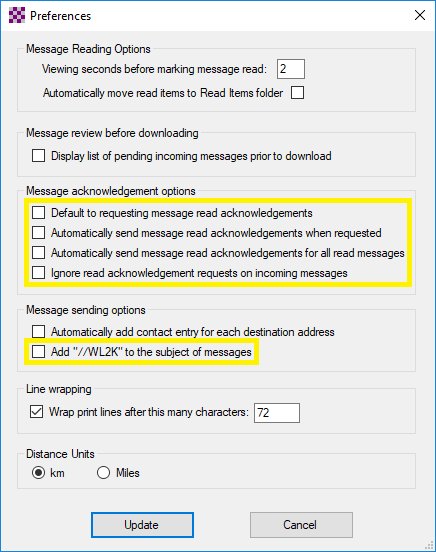
    Are your settings and preferences correct? Everyone, please, in Winlink Express click Settings then Preferences.

    • All of the boxes in the “Message acknowledgement options” section should NOT be checked.
    • In the “Message sending options” section, the “Add //WL2K’ to the subject of messages” should NOT be checked. //WL2K is ONLY needed if you are sending a message FROM a standard (not Winlink) email address to a Winlink address AND your standard email (from) address is not in the recipient’s whitelist.

    In a disaster situation and in drills, the airways and gateways are very busy. That is why we stress keeping all communications brief and to the point and we do not engage in chit-chat and social niceties. This goes for voice as well as Winlink. Do not send any messages that are not asked for in the drill guide. Do not send copies (cc) unless requested. Do not ask for or send receipt acknowledgement messages. Do not resend a message if you don’t get a response quickly. Do not send large file attachments. (One gateway crashed because of this.) All of these things steal time from the frequencies and gateways and slow the delivery of the essential message traffic.

    Every drill should be treated as if it were a real disaster response. Preparing for drills keeps us ready should something happen and we are activated. Following these suggestions (did I mention to read the Drill Guide?) will keep us all on our toes and ready to serve when we are called upon.

  • MCARES Annual Survey

    Our annual survey should have hit the inbox of all our active members on October 29. It takes about 15 minutes to fill out and is very important to the leadership team in planning for the coming year. If you have not submitted your survey yet, please do so. If you can’t find it, email me at eliza [dot] pride [at] gmail [dot] com and I will resend it.

    The first part of the survey makes sure we have up to date contact information for you. The next section wants to know what you are able to do with your own equipment at your home, with your field go kit, and on the road. Next we ask your confidence level in performing various tasks. And finally we want to know how we are doing, what changes you would like to see, and how you can contribute. We read every comment and rely on this survey to shape the coming year’s training and activities

  • Training News

    Thirteen members completed their ARRO training this month:

    • Alpha Team: Jonathan KI7QNR and Alex KE7SIN
    • Bravo Team: Shawn AG7JZ, Lee KI7QHW, and Matthew KI7RLP
    • Charlie Team: Kim KI7RMK, Donna AG7MO, Eric KI7RUQ, Brian KG7QAC, and Edie W7ELC
    • Delta Team: Jeff KI7TVE
    • Echo Team: Cindy KD7IXZ and Scott KD7ZUH
    • Supporting Member: Keith KI7VKM.

    Congratulations to all!

  • Vista House/Rooster Rock Event

    Echo team helped Vista House at Crown Point celebrate its 100 year anniversary by holding a public outreach and training event on July 14. We had an outreach table set up in Vista House with flyers and the orange go-kit, and team members to answer questions and invite folks to tour the MCARES trailer which was in full operation in the parking lot.

    The yellow digital kit was set up with another public outreach table under a tree by the river at Rooster Rock State Park just down the hill.

    Everyone got a chance to try some image transfer with MMSSTV and to work gateway and peer-to-peer Winlink, so it was a great training exercise as well.

    Thanks to Deb KK7DEB for bringing the trailer and handling the training there and to John KI7LYP and Patti KB7GMM for handling the Rooster Rock PR and training. Appreciation also goes to Tom KE7JTM and Ken KI7RUN for helping to coordinate with Vista House and Oregon State Parks. And thanks to all the participating Echo team members who put in a total of 42 volunteer hours on a very hot Saturday!

  • Training News

    In the requirements for the Net Control Field Operator (NCFO) certificate, FEMA class IC 800 has been replaced with IS 802. This class covers Emergency Support Function (ECF) 2: Communications and is more relevant to our mission. It is also easier and is recommended for all MCARES AROs, and required for the NCFO certificate.